10Tec Company
top bar image
Free Newsletter
Your e-mail:


Top 10 Reasons to Buy hTooltip

This page contains the description of the main characteristic or unique features of the hTooltip component.

 1 hTooltip allows you to control practically each aspect of a tooltip you generally need in your apps:
  • the color of the text and the background color;
  • the length of time before the tooltip window appears and how long it remains visible;
  • the style - standard rectangular or modern balloon;
  • you can add a title and display one of the predefined system icons in the tooltip;
  • the internal margins inside the tooltip window;
  • you can specify the maximum width of the tooltip window and the tooltip text will be wrapped automatically;
  • the ability to display tooltips in inactive windows.
 2 You can set multiline text and use tab stops inside the hTooltip tooltips:
 3 The tooltips created with hTooltip automatically use the visual effects (the fade or slide effect) available in your OS. The hTooltip tooltips also use Windows XP visual styles if they are available in your app.
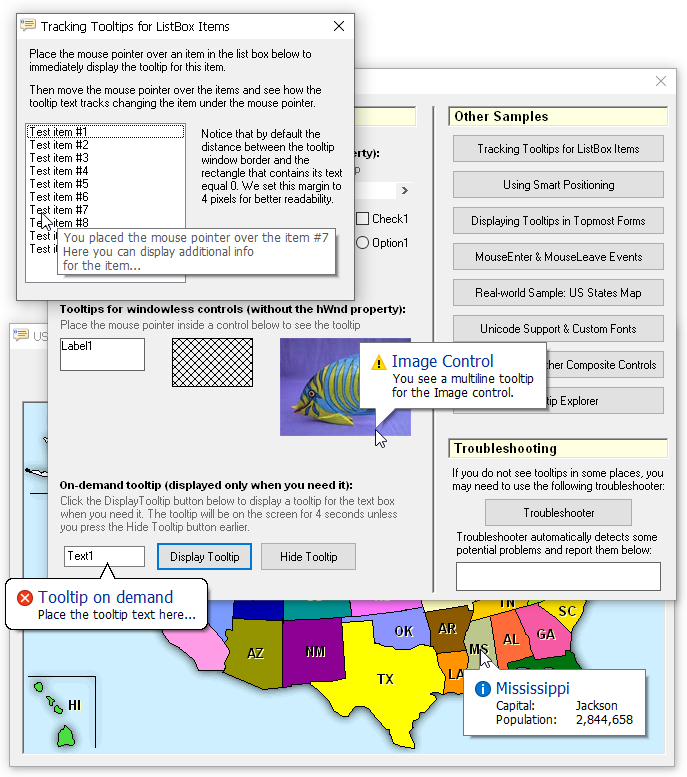
 4 hTooltip provides you with the ability to display a tooltip on demand. You display such display-on-demands tooltips when you need it and in the specified point in your form:
 5 The ability to display a tooltip on demand can be also used to implement so called tracking tooltips, when the tooltip tracks the mouse pointer movement and changes its text accordingly:
 6 hTooltip allows you to create a real native Windows tooltip for any intrinsic Visual Basic control in one statement with the CreateForVBCtrl method, for instance:
objTooltip.CreateForVBCtrl Label1
You can even create a tooltip for a particular rectangular part inside a control, not for the entire control using the CreateForRect method:
objTT.CreateForRect Picture1.hWnd, 0, 0, 90, 90
 7 Notice that hTooltip allows you to create tooltips for ALL Visual Basic controls, even for those which do not have its own WinAPI handle (also known as windowless controls), such as the Label, Shape and Image controls.
 8 When you attach the hTooltip tooltip object to a control, the tooltip object raises the MouseEnter and MouseLeave events when the mouse pointer enters and leaves the area occupied by the control. These events are generated properly when the control is overlapped by another control or a window. You can even use these events if the tooltip window is never displayed!

See how these events were used to highlight the label under the mouse pointer and output the corresponding message in the status bar when the pointer entered a label or left it:

Just imagine how you would implement this task using only the standard events like MouseMove! With hTooltip we simply change the backcolor of the label under the pointer in the MouseEnter event and reset it to the default value in MouseLeave.

 9 You can significantly simplify your work when you create a large number of tooltips in your code with tooltip patterns. hTooltip allows you to define a tooltip pattern that stores common properties of the tooltip you are going to create, and then simply initialize your tooltips in one statement with the tooltip pattern.

In Visual basic you can also use the global DefaultTooltip object for this purpose. This object stores the default properties of all tooltips you will create and it becomes accessible in your code without preliminary declaration when you set the reference to the hTooltip library in your project.

10 And finally, the hTooltip DLL is an ActiveX DLL that implements COM objects. It allows you to use this library not only in Visual Basic 5-6, you can also use it in many development environments which support COM, such as Visual Basic for Applications (VBA) in MS Office, the .NET Framework, Visual FoxPro, Delphi and others.
 
In this section:
Download Demo
  Back to Top
Visit our partners:
Visual Basic News & Information Source Tools and components for software developers ViewSlip - Perfest products for your business! Quality Tools for Serious Microsoft Developers Shareup Networks Downloads vbAccelerator.com Download software from TopShareware.com Shareware and Freeware downloads and tested, rated and reviewed software submitted by software author.
Everything Visual Basic, from Visual Basic 3 to Visual Basic Xml Upload.com: a web service for promoting and selling software online
© 10Tec Company. Last updated: 20 Mar 2008